Learn about assistive technology for people with reading disabilities, dyslexia, low vision, blindness and other disabilities that make reading, writing, and other tasks difficult. Written by someone who uses assistive technology to read and write.

Showing posts with label Chrome. Show all posts

6/21/13

Google's Advance Voice Search Comes to Chrome


Recently Google added advanced voice search to the Chrome browser. Google's advance voice search feature was previously only available for Android and iOS, but is now available on Mac and Windows. The feature is similar to Apple's Siri ,but works on your computer as well as mobile devices. To access the feature, navigate to Google using the Chrome browser and press the microphone icon to the right of the search bar. Then you can search by voice and Google will speak back select results. I have found the voice recognition to be very fast and accurate. One of the most notable features for struggling spellers is that you can ask how to spell a word and then Google will speak back the correct spelling. Google will also provide spoken responses for many other queries as well. Watch the above video to learn more.

12/30/11

ChromeVis: Free Tool for Chrome Users With Low Vision


ChromeVis is a simple Chrome extension for users with low vision. ChromeVis is simple to use and has many customization options. To use ChromeVis highlight the text you want magnified and then click on the ChromeVis icon in the top right of your Chrome window. To customize the appearance of ChromeVis right click on its icon and select options. To download ChromeVis for free click here.

12/18/11

Google Dictionary Defines Any Word on the Web


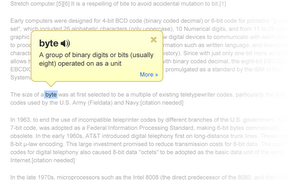
Google Dictionary is a free extension available for Google Chrome. To download the extension click here. Once downloaded simply double click on any word on a web page to view its definition or hear the word read aloud. Google Dictionary is perfect for quickly looking up unfamiliar words. To learn about other Chrome extensions click here.

9/17/11

Many Google Services Become More Accessible


This week Google announced a number of accessibility upgrades for various services. Among the services that were upgraded were Google+, Google Docs and Google Calendar. 

The Google Docs and Google Calendar update improves their compatibility with screen readers. Now it is easier to use these services with VocieOver, Jaws and ChromeVox. Google Docs and Google Calender now have more keyboard shortcuts for easier navigation. To learn more about the upgrades click here and here. Google Docs and Google Calendar are free for anyone with a Google account.

Another Google service that received accessibly upgrades is Google+. Google+ is an invitation only social network. One of Google+'s standout features is hangouts. Hangouts is a group video chat feature that supports multiple friends. When chatting, Google+ recognizes who is talking and brings their video to the front of everyone else's screen. People that use sign language were previously unable to get the floor of a group chat. Because people who sign language do not make noise Google+ was unable to recognize that they were talking. The update in Google+ gives deaf users the option to press shift+s during a chat to get them self recognized.

To watch a video about Google+'s hangout feature click read more below.


8/5/11

Speech Recognition Extensions For Chrome


 The Chrome browser by Google is well liked by many users. To download Chrome click here. Now there are many extensions that allow you to speech your text into any webpage. This feature is enabled for Google search by default in Chrome. To read more about Google voice search click here. With an extension such as Voice Search you can add voice search to any text box on any page. To download the Voice Search extension click here. Voice input is very helpful for people who have trouble spelling or for people who have trouble using the keyboard. To watch a video about Google voice search click read more below.


8/4/11

ChromeShades Helps Web Developers Make Accessible Websites

ChromeShades is an extension on the Chrome Web Store. ChromeShades helps website developers make accessible websites by taking out all visual elements and displaying the webpage as a screen reader or Braille display would recognize the page. ChromeShades helps web developers recognize accessibility problems with their site. Chrome frame is free on the Chrome Web Store.

If you have found any accessibility problems with this site please leave a comment including where the problem occurred and what browsers you were using.   


7/20/11

Spell Checker Add-On for Internet Explorer


Most web browsers have a built in spell checker. Chrome, Firefox and Safari all include built-in spell checkers. But one of the most popular browsers, Internet Explorer, does not include a built-in spell checker. Luckily for Internet Explorer users there is a free spell check add-on called Speckie. To install Speckie click this link. Speckie is compatible with all versions of Internet Explorer.  When Speckie is installed it checks your spelling as you type; then if it detects a word not in the dictionary it underlines the word in red. To correct the misspelled word right click and select the correct word from the drop down menu. Speckie is a good replacement for a built-in spell checker in Internet Explorer. For more information about spelling and grammar correction software refer to an earlier post about Ginger.  

7/1/11

Speakit! Chrome Extension Reads any Text Aloud


SpeakIt! is an extension for Google chrome that can read the web to you. The extension is a free download from the Chrome Web store. SpeakIt! reads selected text aloud. To activate the speech highlight text that you wish to read, press the SpeakIt! logo in the top right and click the play button. To pause the play back press the pause button in the top right. SpeakIt! is a very simple text to speech converter. SpeakIt! is only available for Google Chrome Users.

6/30/11

Google Speech Recognition now Available for Text Fields Across the Web


Last week Google added voice search to it search page. This new feature allows Chrome users to speak rather than type their searches. Previously this feature was only available for Google search but recently Google added the service to  other text fields across the web. Currently the feature is only available for Google chrome users. To activate the feature click on the speech button shown above and speak to input text. (requires a microphone) This feature can help poor spellers and people that are unable to use a keyboard.Voice recognition is accurate and works quickly. The feature does not allow you to navigate within a webpage it only allows for text input. Note: This feature may only be available for certain users and in beta builds of Chrome.