Learn about assistive technology for people with reading disabilities, dyslexia, low vision, blindness and other disabilities that make reading, writing, and other tasks difficult. Written by someone who uses assistive technology to read and write.

Showing posts with label no cost. Show all posts

5/18/12

Ginger Extension for Chrome Adds Contextual Spelling And Grammar Correction


Ginger, the contextual spelling and grammar correction software is now available as a free Chrome Extension. If you are not familiar with Ginger click here. The software can correct spelling and grammar for any written text in the Chrome web browser. Ginger is great for people that struggle with spelling or people who are learning English. To download Ginger for Chrome click here.


1/19/12

New iTunes U App: Perfect for Students and Educators

Today, Apple announce a new iTunes U App for iPad, iPhone and iPod Touch. To download the free app click here. The app allows students view classes, slide shows, documents and more from their classes. iTunes U also allows teachers to post assignments, video or audio of classes, slide shows, documents and more for uses by their students. iTunes U allows users to participate in classes from top university and organizations regardless of if the users attends the school. iTunes U can now be used by K-12 schools as well as universities. All classes are free to the public on iTunes U. iTunes U allows students to view and check off assignments, take notes and review missed classes. Apple describes the app as,

"Whether you’re taking a European history course in your spare time, learning Spanish in high school, or majoring in molecular biology at a university, you now have a powerful tool to help you get the most out of your classes. The new iTunes U app expands the classroom experience by putting all the materials for a course — audio and video, new iBooks Textbooks for iPad and other books, a syllabus and class assignments, posts from the instructor, PDFs, presentations, and more — just a tap away on your iPad, iPhone, or iPod touch."
Apple also says how iTunes you keeps you current, 
"When you take an iTunes U course, you’ll always have the most current information at your fingertips. With a tap, you can listen again to the most recent lecture or review the latest presentation to make sure you got all the details. Stay on top of your assignments and check them off as you complete them. And when an instructor sends a message or creates a new assignment, you’ll receive a push notification with the new information."
Click read more below to view additional pictures of the new iTunes U app.


12/18/11

Google Dictionary Defines Any Word on the Web


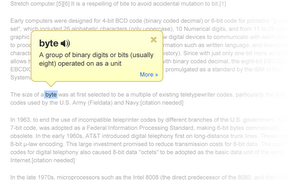
Google Dictionary is a free extension available for Google Chrome. To download the extension click here. Once downloaded simply double click on any word on a web page to view its definition or hear the word read aloud. Google Dictionary is perfect for quickly looking up unfamiliar words. To learn about other Chrome extensions click here.

10/31/11

SoundAmp Giveaway


Below is a promo code for SoundAmp. To learn more about SoundAmp click here. To win the app enter the code into iTunes. The first person to enter the code will win the SoundAmp app. Once one person enters the code it will no longer work. If you do not win check back latter for another code. Good Luck.

J433MHW4MHXA

10/28/11

SoundAmp Giveaway


Below is a promo code for SoundAmp. To learn more about SoundAmp click here. To win the app enter the code into iTunes. The first person to enter the code will win the SoundAmp app. Once one person enters the code it will no longer work. If you do not win check back latter for another code. Good Luck.

F7JRWHKA39XM


10/24/11

SoundAmp Giveaway


SoundAmp is a hearing aid App for iOS devices. To learn more about SoundAmp click here. Check back here later for the chance to win promo codes for SoundAmp. If you do not win the code check back later for more codes.

9/1/11

List of Free Assistive Technology

The National Center on Universal Design for Learning (UDL) has a compiled a list of free assistive technology devices and services. To see the list click here. The list includes information about free text-to-speech, voice recognition, audio books, writing tools and much more. The list is perfect for parents, students and teachers looking for free assistive technology.