Learn about assistive technology for people with reading disabilities, dyslexia, low vision, blindness and other disabilities that make reading, writing, and other tasks difficult. Written by someone who uses assistive technology to read and write.

Showing posts with label assistive tech. Show all posts

10/27/13

Apple's Announcements Impact on Accessibility


This week Apple announced a variety of new hardware and software products at media event. While Apple executives didn't devote stage time to accessibility announcements as they have in years past, the announcements still impact accessibility and assistive technology.

Mac

Apple previewed OS X Mavericks at their World Wide Developers Conference (WWDC) in June. This week Apple released the Mac operating system to the public and announced that it would be a free update. Like iOS 7, Mavericks includes some exciting accessibility improvements including enhanced dictation and Switch Control. Click to read more about each new feature.

iPad
The main focus of the event was updated iPads. Apple released a new full size iPad named iPad Air. The iPad Air is considerably thinner and lighter than the previous full size iPad. In addition to the slimmer design Apple included the new A7 processor which increases performance. The iPad mini was also updated to include a higher quality retina display and is now called the iPad mini with Retina display. Notably, the new iPads don't include Apple's new Touch ID finger print sensor that debut on the iPhone 5s.

Updated Apps

Apple updated their iLife and iWork software for both the Mac and iOS devices. The updates have some useful new features, but I have not found any new accessibility features in these updates. Notably, Apple's education focused iOS apps iBooks and iTunes U were not updated. I'm hopeful that these apps will be updated soon and include new features. In particular, I hope Apple adds improved text-to-speech integration for iBooks. In particular I hope a "read" or "speak" button will be added to allow continuous text-to-speech with highlighting for all books. Currently continuous text-to-speech with highlighting is not possible in iBooks. 

iOS 7.0.3

iOS 7.0.3 is a minor update to iOS 7 but the new release includes a few accessibility improvements. In iOS 7.0.3 the reduce motion accessibility setting decreases navigation animations. This is designed to limit motion sickness that some users reported after updating to iOS 7. iOS 7.0.3 also includes VoiceOver fixes for a sensitivity issue that was present in previous versions of iOS 7.

2/11/12

TurboScan App Review


TurboScan is a app for the iPad, iPhone and iPod Touch. The app uses the built in camera to capture a document and convert the image to excellent quality PDF files. TurboScan is $1.99 in the App Store. The app will not work very well with the iPad or iPod Touch because they do not have high quality cameras like the iPhone. The app has a simple interface that is easy to learn. It allows you to capture documents by taking a picture with your iPhone camera or import one from your album. TurboScan also has an option to take three pictures of the document for better accuracy. TurboScan also allows users to scan documents that are more than one page.

Once you have taken the picture of your document TurboScan detects the edges of the document and makes a PDF file. The apps has a few sharing options but not as many as JotNot Pro. The sharing include email and a really nice option called "email to myself" witch allows to quickly email your self the documents you have created.

Once you have your documents on your computer you can open them with Kurzweil to use all of Kurzweil's features such as read aloud and note taking. The PDF files created are crisp and clear.

Click read more below to see more pictures and videos of TurboScan.
Document made with TurboScan click for full size


App provided complimentary to reviewer 
  

2/4/12

Kraken II Dockable Case for iPhone 4 and iPhone 4S


Many people, including children, use the iPhone as an assistive technology device. The Kraken II Dockable case is an ideal case to protect your iPhone. The Kraken II Dockable Case is great for both children and adults who need superior protection for their iPhone. The case will protect against most bumps and drops so there is less need to worry when using the iPhone.


The Kraken II Dockable Case is a rugged and protective case for the iPhone 4 and iPhone 4S. It features three layers of protection and a few cool features. The first layer of protection is a silicon inner shell. The inner shell is attached to the second layer of protection which is a plastic outer shell. The third layer of protection is a build in screen protector which protects the screen against damage. The outer plastic is a soft touch material that feels nice in the hand and does not show finger prints. All of the ports and buttons are covered with rubber but are still usable. The headphone port, mute switch, and dock connector are covered by rubber flaps to keep out dust. The lock and volume buttons are easy to feel and provide good tactile feed back. The home button is flush with the front of the case and can be hard to locate by feel. The phone speaker is covered by a dust shield that works well. Much like the Kraken AMS, case the Kraken II Dockable Case has a kickstand on the back which is perfect for video chat and much more. On the bottom of the case is a thick silicon flap that can be easily removed to dock the case. It is not common for a rugged case to be able to be dockable. However, with the flap off it is difficult to push the home button because it is very recessed.


At the time of the posting, the case costs about $30 from Amazon.com. Trident says the following about their docking feature of the case:
"The bottom of the case features a removable silicone sleeve which allows the case to be placed in a docking station without the hassle of removing the case."
The case does add bulk to the phone, and makes it heavier and less sleek, but if you are looking for protection, and the ability to dock your iPhone this case is for you.


Click read more below to see more videos and pictures of the Kraken II Dockable Case.


Case was provided complimentary to the reviewer.


2/3/12

iKeyboard: Touch Typing for iPad


iKeyboard is a stick on accessory for the iPad that separates the keys and provides tactile feedback. The iKeyboard sticks over the iPads virtual keyboard while typing but can be stuck to the top bezel when not in use. The iKeyboard may allow users with visual impairments to feel the keys on the iPad and enable them the touch type. The iKeyboard is has a very low profile and will not add much bulk to the iPad. The iKeyboard only works in landscape mode and is compatible with iPad and iPad 2. The iKeyboard is cheaper than a physical iPad keyboard Click read more below to learn more about the iKeyboard.

1/26/12

Ask Siri How to Spell Unfamiliar Words


Siri is a new feature available on the iPhone 4S. I find myself asking others how to spell unfamiliar often. When no one is around I have to find a different word to use. If you are like me Siri can be very helpful. Simply ask Siri "how do you spell..." and Siri will give you the correct spelling in seconds. Siri has many other useful functions such as defining words. To learn more about the iPhone 4S and its accessibility features click here.

1/14/12

Color ID: Free Color Identifier


Color ID is a simple free app that recognizes colors using the iPad, iPhone and iPod Touch's camera. Point the camera at the object you want to know the color of to use the app. Turn on VoiceOver to hear the color of the object be said allowed. Click here to download Color ID. Color ID is ideal for people who are blind or color blind and need to identify the color of clothing or any other object.

1/12/12

Printer Pro For Allows You To Print From Your iOS Device


Printer Pro for iPhone, iPod Touch and iPad allows you to print to most printers from your iOS devices. Click here for the iPad app and here for the iPhone and iPod Touch app. Printer Pro is not a universal app so you will need to buy the app separately for your iPhone and iPad in order to have the best experience. Printer Pro allows you to print to most Wi-Fi printer and any printer attached to your computer by downloading a desktop app. To test to make sure your printer is compatible you can download Printer Pro Lite by clicking here. Setting up is relatively quick and easy. Once you set up your printer the app will remember your printer and you will not need to set it up each time. Printer Pro allows you to print email attachments, files from Dropbox, Web pages, Photos and Contacts. Click read more below to see screen shots of Printer Pro.


This app was provided complimentary to the reviewer.


1/11/12

Use Your iPhone and JotNot as a Portable Scanner


JotNot Pro for iPhone can be used as a portable scanner. JotNot uses the iPhone's camera to take a picture of a document and then processes the image to the center of the screen. It  then removes shadows and noise. To make a PDF of a document simply take a picture of each page of the document with JotNot. JotNot will make a PDF that looks like it was made with a flatbed scanner. Once JotNot has produced a PDF you can email it or save it to a number of cloud services including Google Docs. To learn more about JotNot Pro click here. You can also use JotNot with Kurzweil. Simply email your self the PDF and then open it with Kurzweil. Once the PDF is opened in Kurzweil you can read it using Kurzweil's built in text-to-speech or use any of the Kurzweil editing tools to fill in the blanks, circle or highlight the document. JotNot is the perfect companion to Kurzweil. When you get a hard copy of a document you would like to read with Kurzweil simply take a picture of it with JotNot instead of going to a scanner. Click read more below to see JotNot screen shots and watch more videos.


1/8/12

Prizmo: Fast, Accurate, Full Featured OCR App for iPhone Review


Prizmo is the best optical character recognition (OCR) app for iPhone, iPad and iPod Touch that I have used. Because of  iPhone's superior camera you will have the best results while using Prizmo on the iPhone. Prizmo allows you to take a picture of text, business cards and more and then process them into useful electronic documents. When taking a picture of a business card, Prizmo makes a contact that you can quickly add to your contact list. Prizmo really shines when recognizing text. Simply take a picture then crop it to only include the text that you want to have read and then click "next" to begin the OCR. Prizmo has a very nice feature that allows you to say "take picture" to snap a picture of the document to eliminate shaking as you go to press the shutter button. Prizmo will quickly recognize the text and put it into a text document. Then you can edit any mistakes that Prizmo may have made. One of the only down sides of Prizmo is that it does not allow you to OCR multiple pages into the same text document.

After the text has been recognized you can read the text with a built in reader, VoiceOver or Speak Selection. You can also translate, email or save it to a number of cloud services including Dropbox and Evernote. In order to use the built in reader you must buy a text-to-speech voice for an additional $2.99. The reader allows you to control play back speed, but does not highlight the words as they are being read allowed. It does place a white dot next to the line that is currently being read. Prizmo is great for saving documents in an electronic format or for people who struggle to read and are helped by having text read aloud. Prizmo works faster and more accurately than ZoomReader, TextGrabber and SayText. Prizmo is $9.99 in the iTunes app store. Click here to download or view Prizmo in the App Store. Click read more below to see screen shots and more videos of Prizmo.


Picture of Newspaper Article taken with iPhone 4S
Text Extracted From Image 
Economic Slide Took A Detour at Capitol Hill From Page A1 group.


congress has never been a place for paupers. From plantation owners in the pre-Civil War era to industrialists in the early 1900s to ex-Wall Street financiers and Internet executives today, it has long been populated with the rich, including scions of families like the Guggenheims, Hearsts, Kennedys and Rockefellers.
But rarely has the divide appeared so wide, or the public contrast so stark, between lawmakers and those they represent.
The wealth gap may go largely unnoticed in good times. "But with the American public feeling all this economic pain, people just resent it more," said Alan J. Ziobrowski, a professor at Georgia State who studied lawmakers' stock investments.
There is broad debate about just why the wealth gap appears to be growing. For starters, the prohibitive costs of political campaigning may discourage the less affluent from even considering a candidacy. Beyond that, loose ethics controls, shrewd stock picks, profitable land deals, favorable tax laws, inheritances and even marriages to wealthy spouses are all cited as possible explanations for the rising fortunes on Capitol Hill.
What is clear is that members of Congress are getting richer compared not only with the average American worker, but also with other very rich Americans.
While the median net worth of members of Congress jumped 15 percent from 2004 to 2010, the net worth of the richest 10 percent of Americans remained essentially flat. For all Americans, median net worth dropped 8 percent, based on inflation-adjusted data from Moody's Analytics.
Going back further, the median wealth of House members grew some two and a half times between 1984 and 2009 in inflation.
adjusted dollars, while the wealth of the average American family has actually declined slightly ha that same time period, according Emmar/e Huetteman and Derek Willis t'ontrihutPd rvrmrtino to data cited by The Washington Post in an article published Monday on its Web site.
With millionaire status now the norm, the rarefied air in the Capitol these days is $100 million.
That lofty level appears to have been surpassed by at least 10 members, led by Representative Darrell Issa, a California Republican and former auto alarm magnate who is worth somewhere between $195 million and $700 million. (Because federal law requires lawmakers to disclose their assets only in broad dollar nranges, more precise estimates are impossible.)
Their wealth has created occasional political problems for Congress's richest.
Mr. Issa, for instance, has faced outside scrutiny because of the overlap of his Congressional work and outside interests, including extensive investments with Wall Street firms like Merrill Lynch and Goldman Sachs, as well as land holdings in his San Diego district. In one case, he obtained some $800,000 in federal earmarks for a road-widening project running along his commercial property.
Senator John Kerry, a Massachusetts Democrat who is married to Teresa Heinz Kerry, set off an uproar last year when it was disclosed that he had docked his $7 million, 76-foot yacht not in his home state but in neighboring Rhode Island, which has no sales or use tax on pleasure boats. (Mr.
Kerry, worth at least $181 million, voluntarily paid $400,000 in Massachusetts taxes after criticism.) Representative Nancy Pelosi, the House Democratic leader, was challenged about her wealth, as much as $196 million, by a member of her own party a few weeks ago. Representative Laura Richardson, a California Democrat who is among the poorest members of Congress with as much as $464,000 in debt, attacked Ms. Pelosi at a closeddoor Democratic caucus meeting for endorsing a Congressional pay freeze, according to a report in Politico that was confirmed by other members.
Ms. Richardson angrily told 'lkd[o If'~^l^~: .L _~
Article from New York Times for demonstration purposes

Prizmo was provided complimentary to the reviewer.


1/3/12

Proloquo2Go the Premiere AAC App for iOS


Proloquo2Go is the most full featured augmentative and alternative communication (AAC) app for iOS. The app can help people who have trouble communicating communicate by touching words or phrases that they want to have spoken aloud. To learn more about Proloquo2Go visit their website at Proloquo2Go.com. Proloquo2Go has an extremely visual interface that makes finding what you are looking for easy. The home screen of Proloquo2Go has a grid with folders; each folder has an image and title on it. The user touches a folder to enter that category. For example if you wanted to say "yes" you would click on the yes, no, maybe folder and the touch the yes button. Once you touch the yes button a computerized voice would say "yes." Many folders have numerous sub folders which can make it time consuming to find the word or phrase you would like to say. Luckily, you can make quick sets of words and phrases you use often for quicker access. In addition you can make custom commands such as family member's names or home address. Proloquo2Go also allows users to input the word  they want via a keyboard. The keyboard has advanced word prediction that allows users to insert words faster. When using the keyboard you can type out phrases that Proloquo2Go will say allowed when you are finished typing. Proloqu2Go allow features several high quality text-to-speech voices. Proloquo2Go is a feature filled AAC app that can allow people to communicate. Because of the abundance of features Proloquo2Go can be slightly complex to use at the beginning. To try Proloquo2Go you can stop by your local Apple Store and find the app installed on all of the display iPads. Proloquo2Go is $189.99 in the App Store and works with iPhone, iPad and iPod Touch. Proloquo2Go can replace much more expensive AAC devices and using Apple devices can make users feel less self-conscious than using a dedicated AAC device that is different from anything peers or same age students would use. To watch Proloquo2Go featured on 60 minutes click here. To learn more about Proloquo2Go click read more below.

Key features
  • Full communication solution with a default VocaSpace vocabulary of over 7000 items
  • Choice of list or grid view
  • Built-in natural sounding text-to-speech voices from Acapela Group (one language, initially only British and American English). The current version includes North American English male, female, girl and boy voices. These can be swapped for British English voices, which can be downloaded over Wifi from within Proloquo2Go. Support for other languages and voices is in the pipeline.
  • Supports picture and/or text-based communication
  • Close to 8000 built-in symbols from SymbolStix LLC.
  • Automatic conjugation of verbs
  • Automatic plurals and possessives for nouns
  • Extensive customization options: item size, color, interactivity, restrictions, speech.
  • One-button addition of new vocabulary items and categories
  • Easy cut, copy and paste of items
  • Quick access to recently spoken items for the last 15 minutes, last hour, all the way up to one week back
  • Typing view with advanced, self-learning multi-word prediction for typing full paragraphs

This App was provided complementary to the review by AssistiveWare  


12/30/11

ChromeVis: Free Tool for Chrome Users With Low Vision


ChromeVis is a simple Chrome extension for users with low vision. ChromeVis is simple to use and has many customization options. To use ChromeVis highlight the text you want magnified and then click on the ChromeVis icon in the top right of your Chrome window. To customize the appearance of ChromeVis right click on its icon and select options. To download ChromeVis for free click here.

12/18/11

Google Dictionary Defines Any Word on the Web


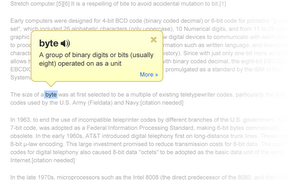
Google Dictionary is a free extension available for Google Chrome. To download the extension click here. Once downloaded simply double click on any word on a web page to view its definition or hear the word read aloud. Google Dictionary is perfect for quickly looking up unfamiliar words. To learn about other Chrome extensions click here.

12/12/11

Great List of Apps to Support Literacy


Greg O'Connor has put together a great list of apps for literacy support on spectronicsinoz.com. To view the list click here. The list is broken into categories reading support, OCR, writing and notetaking support, mind mapping, organizational and study support and reference. Check out the list here.

12/10/11

iBooks Update Adds Useful New Features


Apple recently updated its iBooks app to add more add more features and make reading easier. One of features adds a night time reading theme to make reading in the dark easier on you eyes. The new update also add several new fonts and makes highlighting and taking notes easier. Yet another new feature allows you to read your book in full screen mode. iBooks is available here for iPad, iPhone and iPod Touch. 

11/18/11

Notability Promo Code Giveaway


Below is a promo code for Notability. To learn more about Notability click here. To win the app enter the code into iTunes. The first person to enter the code will win the Notability app for iPad. Once one person enters the code it will no longer work. If you do not win check back later for another code. Good Luck!

R9RXL66AM9Y4

11/16/11

Notability Promo Code Giveaway


Below is a promo code for Notability. To learn more about Notability click here. To win the app enter the code into iTunes. The first person to enter the code will win the Notability app for iPad. Once one person enters the code it will no longer work. If you do not win check back later for another code. Good Luck!

RKTW39JTW7YM

11/13/11

Notability Promo Code Giveaway


Below is a promo code for Notability. To learn more about Notability click here. To win the app enter the code into iTunes. The first person to enter the code will win the Notability app for iPad. Once one person enters the code it will no longer work. If you do not win check back later for another code. Good Luck!

PTJTW3X4TPRK

11/10/11

Dragon Express: Control Your Mac by Voice


Today, Nuance released Dragon Express for the Mac. Dragon Express allows users to preform key functions solely with the sound of their voice. The app is available here on the Mac app store for $49. Dragon Express can send emails, search with spotlight, post Twitter and Facebook updates, search the web and more. Dragon Express is an introductory product designed for people who are new to voice recognition. Dragon Express lacks many key features of the more expensive Dragon Dictate. See the comparison chart below to see the difference between Dragon Express and Dragon Dictate.


Dragon Express uses Nuance's great speech recognition technology to accurately turn your voice into text. Nuance claims that using Dragon is three times faster than typing. To learn about Dragon apps for iOS click here. Stay tuned for more about Dragon Naturally Speaking. Click read more below to view screen shots of Dragon Express and read the press release.


Nuance Press Release

BURLINGTON, Mass., Nov 10, 2011 (BUSINESS WIRE) — Nuance Communications, Inc., today announced the immediate availability of Dragon Express, an introductory voice recognition app for Mac OS X Lion. Dragon Express is an easy and fun way to put words to work without the hassle of typing, allowing users to do more in less time. Dragon Express is available exclusively for download from Apple’s Mac App Store.
Dragon Express is the latest member of the Dragon family of speech recognition software that lets people control a computer with their voice. It’s the fast, hands-free way to turn speech into text, whether sending email, surfing the Web or posting an update to Facebook and Twitter. Dragon provides an easy, natural way to get more done in less time. Dragon Express is priced to provide the broadest range of people with an opportunity to experience the power and performance of speech recognition.
“Dragon Express is a great app for those who are new to speech recognition or who are looking for an easy-to-use dictation tool that allows them to use their voice instead of typing,” said Peter Mahoney, senior vice president and general manager, Dragon, Nuance. “For those looking for a more full-featured speech recognition program, we recommend Dragon Dictate, which provides the full capabilities of advanced speech recognition technology.”
Dragon Express can be conveniently accessed from the menu bar at any time and doesn’t require a network connection. Users dictate directly into the Dragon Express window, using the internal Mac microphone or a USB headset microphone (which can be purchased via www.nuance.com ), and the text instantly appears in the Dragon Express window. When finished, Dragon Express places the transcribed text into the application of choice. The download comes with a short enrollment so that the app can better recognize a user’s unique voice.
Dragon Dictate, the most full-featured and advanced speech recognition software for Mac OS, was recently updated to version 2.5. Dragon Dictate 2.5 includes many features beyond those in Dragon Express. These features include the ability to dictate directly into applications, edit, format and correct recognition errors by voice, open and close applications by voice, control the mouse by voice, create custom voice commands and support for the recently released Dragon Remote Mic app for iPhone.
Dragon Express Details
Media: Application download from the Mac App Store available here. Pricing: Introductory price of $49.99 Platform: OS X Lion only Languages: English (US and UK) System Requirements: OS X Lion
About Nuance Communications, Inc
Nuance Communications, Inc. is a leading provider of voice and language solutions for businesses and consumers around the world. Its technologies, applications and services make the user experience more compelling by transforming the way people interact with devices and systems. Every day, millions of users and thousands of businesses experience Nuance’s proven applications. For more information, please visit www.nuance.com .
Trademark reference: Nuance, Dragon and the Nuance logo are registered trademarks or trademarks of Nuance Communications, Inc. or its affiliates in the United States and/or other countries. All other company names or product names referenced herein may be the property of their respective owners.