Learn about assistive technology for people with reading disabilities, dyslexia, low vision, blindness and other disabilities that make reading, writing, and other tasks difficult. Written by someone who uses assistive technology to read and write.

Showing posts with label one click. Show all posts

12/28/11

Add Quick Text-to-Speech Button to Microsoft Word


Microsoft Word has a hidden text-to-speech button built in. To access add the text-to-speech button to the quick access tool bar click on the down arrow in the top left corner of the screen. Next click on more commands and then click on all commands from the drop down menu. Finally click on speak from the list and then press add. To use the text-to-speech feature select the text you wish to have read and click on the text-to-speech button you just added to the top left corner of the screen. The text will be read allowed instantly. Click the button again to stop the text-to-speech. Watch the video above to learn more. Click read more below for step by step instructions.


12/18/11

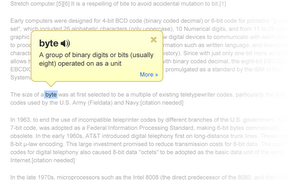
Google Dictionary Defines Any Word on the Web


Google Dictionary is a free extension available for Google Chrome. To download the extension click here. Once downloaded simply double click on any word on a web page to view its definition or hear the word read aloud. Google Dictionary is perfect for quickly looking up unfamiliar words. To learn about other Chrome extensions click here.