Learn about assistive technology for people with reading disabilities, dyslexia, low vision, blindness and other disabilities that make reading, writing, and other tasks difficult. Written by someone who uses assistive technology to read and write.

Showing posts with label OCR. Show all posts

9/21/13

New in iOS 7: Redeem iTunes Gift Cards with the Camera


Apple’s new mobile operating system for iPhone, iPad, and iPod Touch includes the ability to redeem iTunes gift cards with the camera instead of manually typing long codes. To redeem a gift card with the camera go to the iTunes Store, App Store, or iBooks Store and hit redeem at the bottom of the featured page. Then choose to redeem the gift card with the camera. You can use either the front facing or rear facing camera. To redeem the gift card just point the camera at the back of the gift card and the code is automatically redeemed. This new feature makes it possible for the blind and visually impaired to redeem gift cards without sighted assistance. Also, iOS 7 eliminates the need for sighted users to type in long and complicated codes. iOS 7 is available now for iPhone, iPad, and iPod Touch.

12/30/12

Favorite Assistive Technology Apps & Products of 2012


As 2012 comes to a close I decided to make a run down of my favorite assistive technology apps and products that I have been using this year. This list is in no particular order.

Click read more view the list.


The Sky WiFi Smartpen is easy to use and seamless. It has a built in recorder and camera that, when used with specialized paper, syncs audio and written notes in the cloud. To read the Sky WiFi Smartpen review click here.


iPad mini is a great tablet because of its size, app selection, and accessibility. The lower price point makes it even more compelling. Most of all iPad mini runs all the apps that the full size iPad does and has accessibility features second to none. Click here to read more about the iPad mini.


While iOS 6 many have been short on mainstream features it has several useful accessibility features including Guided Access, highlighting with Speak Selection, Siri improvements, and VoiceOver improvements. Click here to learn more about iOS 6.


This update included great new voice search feature that I found to be better and faster than Siri. Click here to learn more about the Google Search App for iOS.


This app has a really nice interface and good scan quality which made it my favorite scanning app of 2012. Click here to learn more.


Prizmo is hands down the best OCR app for iPhone that I have used. Just take a picture of a document and it will read it to you in a matter of seconds. Click here to download or learn more about Prizmo.


A great reader of Bookshare books that allows you to read your books portably without a computer. Bookshare is an online accessible library avalible to qualified people. Click here to download or learn more about Read2Go.


Kurzweil isn't new to 2012 but it is a program I use everday. It helps me tremendously and it deserves a spot on this list. Click here to learn more about Kurzweil 3000.


Good app for listening to Learning Ally Audio books. The free app is available for all iOS devices. I would like to see the app include new features such as background audio in 2013. Click here to learn more.


PaperPort Notes App Adds OCR Functionality


Nuance's PaperPort Notes app for iPad received a major update. The highlight of the update is the ability to take a picture of text to add the text to your notes. The Optical Charactor Recongition (OCR) feature is slower than other competing apps but is accurate. The improved cameras on the newest iPads allow OCR to work well. To learn about the other features of the free PaperPort Notes app click here. Click here to download the app.

Click read more below to view screenshots of PaperPort Notes.


12/1/12

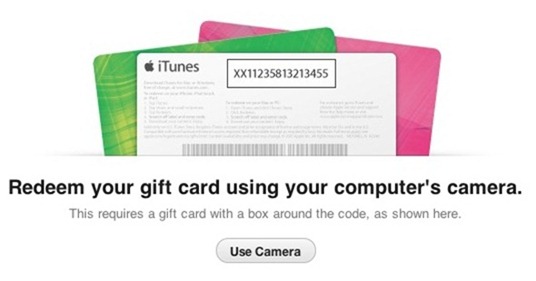
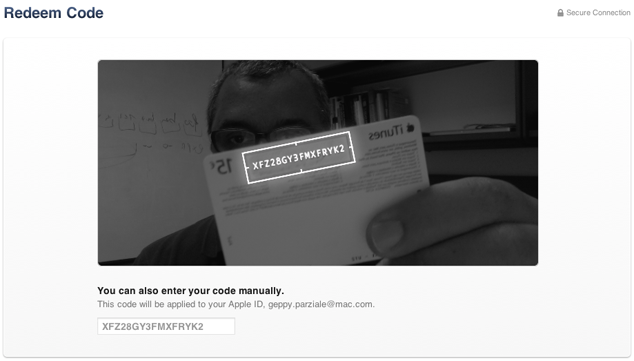
iTunes 11 Feature Helps Visually Impaired Redeem Gift Cards


A feature in Apple's iTunes 11 allows you to scan a gift card code using your computer's camera. The feature is particularly intriguing for the blind, visually impaired and for dyslexics. While it may be inconvenient for most people to type the 16 digit code, it is impossible for users who are blind or visually impaired, and can be a struggle for some dyslexics. To use the feature position the gift card in front of the computer's camera. For people with visual impairments VoiceOver, Apple's built in screen reader on your Mac will help you frame the card in the picture. Then iTunes recognizes the code and credits the money to your iTunes account. This feature makes it possible for the blind and visually impaired to easily and independently redeem iTunes gift cards. Maybe this cool scanning feature will make its way to iOS in the near future.

Click read more below to view pictures of the scanning feature in action.


1/8/12

Prizmo: Fast, Accurate, Full Featured OCR App for iPhone Review


Prizmo is the best optical character recognition (OCR) app for iPhone, iPad and iPod Touch that I have used. Because of  iPhone's superior camera you will have the best results while using Prizmo on the iPhone. Prizmo allows you to take a picture of text, business cards and more and then process them into useful electronic documents. When taking a picture of a business card, Prizmo makes a contact that you can quickly add to your contact list. Prizmo really shines when recognizing text. Simply take a picture then crop it to only include the text that you want to have read and then click "next" to begin the OCR. Prizmo has a very nice feature that allows you to say "take picture" to snap a picture of the document to eliminate shaking as you go to press the shutter button. Prizmo will quickly recognize the text and put it into a text document. Then you can edit any mistakes that Prizmo may have made. One of the only down sides of Prizmo is that it does not allow you to OCR multiple pages into the same text document.

After the text has been recognized you can read the text with a built in reader, VoiceOver or Speak Selection. You can also translate, email or save it to a number of cloud services including Dropbox and Evernote. In order to use the built in reader you must buy a text-to-speech voice for an additional $2.99. The reader allows you to control play back speed, but does not highlight the words as they are being read allowed. It does place a white dot next to the line that is currently being read. Prizmo is great for saving documents in an electronic format or for people who struggle to read and are helped by having text read aloud. Prizmo works faster and more accurately than ZoomReader, TextGrabber and SayText. Prizmo is $9.99 in the iTunes app store. Click here to download or view Prizmo in the App Store. Click read more below to see screen shots and more videos of Prizmo.


Picture of Newspaper Article taken with iPhone 4S
Text Extracted From Image 
Economic Slide Took A Detour at Capitol Hill From Page A1 group.


congress has never been a place for paupers. From plantation owners in the pre-Civil War era to industrialists in the early 1900s to ex-Wall Street financiers and Internet executives today, it has long been populated with the rich, including scions of families like the Guggenheims, Hearsts, Kennedys and Rockefellers.
But rarely has the divide appeared so wide, or the public contrast so stark, between lawmakers and those they represent.
The wealth gap may go largely unnoticed in good times. "But with the American public feeling all this economic pain, people just resent it more," said Alan J. Ziobrowski, a professor at Georgia State who studied lawmakers' stock investments.
There is broad debate about just why the wealth gap appears to be growing. For starters, the prohibitive costs of political campaigning may discourage the less affluent from even considering a candidacy. Beyond that, loose ethics controls, shrewd stock picks, profitable land deals, favorable tax laws, inheritances and even marriages to wealthy spouses are all cited as possible explanations for the rising fortunes on Capitol Hill.
What is clear is that members of Congress are getting richer compared not only with the average American worker, but also with other very rich Americans.
While the median net worth of members of Congress jumped 15 percent from 2004 to 2010, the net worth of the richest 10 percent of Americans remained essentially flat. For all Americans, median net worth dropped 8 percent, based on inflation-adjusted data from Moody's Analytics.
Going back further, the median wealth of House members grew some two and a half times between 1984 and 2009 in inflation.
adjusted dollars, while the wealth of the average American family has actually declined slightly ha that same time period, according Emmar/e Huetteman and Derek Willis t'ontrihutPd rvrmrtino to data cited by The Washington Post in an article published Monday on its Web site.
With millionaire status now the norm, the rarefied air in the Capitol these days is $100 million.
That lofty level appears to have been surpassed by at least 10 members, led by Representative Darrell Issa, a California Republican and former auto alarm magnate who is worth somewhere between $195 million and $700 million. (Because federal law requires lawmakers to disclose their assets only in broad dollar nranges, more precise estimates are impossible.)
Their wealth has created occasional political problems for Congress's richest.
Mr. Issa, for instance, has faced outside scrutiny because of the overlap of his Congressional work and outside interests, including extensive investments with Wall Street firms like Merrill Lynch and Goldman Sachs, as well as land holdings in his San Diego district. In one case, he obtained some $800,000 in federal earmarks for a road-widening project running along his commercial property.
Senator John Kerry, a Massachusetts Democrat who is married to Teresa Heinz Kerry, set off an uproar last year when it was disclosed that he had docked his $7 million, 76-foot yacht not in his home state but in neighboring Rhode Island, which has no sales or use tax on pleasure boats. (Mr.
Kerry, worth at least $181 million, voluntarily paid $400,000 in Massachusetts taxes after criticism.) Representative Nancy Pelosi, the House Democratic leader, was challenged about her wealth, as much as $196 million, by a member of her own party a few weeks ago. Representative Laura Richardson, a California Democrat who is among the poorest members of Congress with as much as $464,000 in debt, attacked Ms. Pelosi at a closeddoor Democratic caucus meeting for endorsing a Congressional pay freeze, according to a report in Politico that was confirmed by other members.
Ms. Richardson angrily told 'lkd[o If'~^l^~: .L _~
Article from New York Times for demonstration purposes

Prizmo was provided complimentary to the reviewer.


12/29/11

TextGrabber: Fast, Cheap, Accurate OCR app for iPhone


TextGrabber is a low cost OCR app for iPhone that quickly and accurately converts printed text into digital text that can be edited or read aloud using text-to-speech. Click here to download TextGrabber. The app is easy to use. Snap a photo of the text you want to read then crop the photo and finally read the text. TextGrabber only takes a few seconds to convert the printed text into a digital format. Once the text has been recognized you can have it read aloud to you using VoiceOver. TextGrabber can also translate captured text into many languages. One negative of TextGrabber is it does not have built in text-to-speech,  or Speak Selection, a new iOS 5 feature, does not work. In day-to-day use I found that TextGrabber and ZoomReader offer similar OCR speed and accuracy. To improve the accuracy turn on the flash while taking the picture. TextGrabber does not feature built in text-to-speech with highlighting while ZoomReader does not offer a cropping tool for removing unwanted text. To read more about ZoomReader click here. Click read more below to see screen shots and examples of TextGrabber in action,including a step- by -step depiction of TextGrabber converting a newspaper article.

Picture of Newspaper Article Taken with iPhone 4S camera.
Crop the Section You Want to Read
Press Read and Let it do its Work
Finish Product Ready to be Read by VoiceOver or Emailed.
Below is the text that was extracted. It is not perfect but is a par or better than most other OCR apps for iPhone.
^ Economic Slide Took A Detour at Capital Hill From Page Al group. Congress has never been place for paupers. From planta" tion owners in the pre-Civil War era to industrialists in the 1900s to ex-Wall Street financiers and Internet executives today, it has long been populated with"the rich, including scions of families like the Guggenheims, Hearsts. Kennedys and Rockefellers. But rarely has the divide ap- peared so wide, or the public con- trast so stark, between lawmak- ers and those they represent. The wealth gap may go largely unnoticed in good times. "But with the American public feeling all this economic pain, people just resent it more," said Alan J. Zio- browski, a professor at Georgia State who studied lawmakers' stock investments. There is broad debate about just why the wealth gap appears to be growing. For starters, the prohibitive costs of political cam- paigning may discourage the less affluent from even considering a candidacy. Beyond that, loose ethics controls, shrewd stock picks, profitable land deals, fa- vorable tax laws, inheritances and even marriages to wealthy spouses are all cited as possible explanations for the rising for- tunes on Capitol Hill. What is clear is that members of Congress are getting richer compared not only with the aver- age American worker, but also with other very rich Americans. While the median net worth of members of Congress jumped 15 percent from 2004 to 2010, the net worth of the richest 10 percent of Americans remained essentially Hat. For all Americans, median net worth dropped 8 percent, based on jnflation-adjusted data from Moody's Analytics. Going back further, the median wealth of House members grew some two and a half times be. tween 1984 and 2009 in inflation- adjusted dollars, while the wealth of'the average American family has actuaily declined slightly in that same time period, according Emmarie Huetteman and Derek Willts contributed rfmrtiw SJata cited by The Washington _'"an article published Mon- with millionaire status now the norm, the rarefied air in'the Capi- days is $100 million. lofty level appears to have surpassed by at least 10 members, led by Representative Issa, a California Repub- and former auto alarm mag- nate who is worth somewhere be- tween $195 million and $700 mil- lion. (Because federal law re- quires lawmakers to disclose their assets only in broad dollar ranges, more precise estimates are impossible.) Their wealth has created occa- sional political problems for Con- gress's richest. Mr. Issa, for instance, has faced outside scrutiny because of the overlap of his Congressional work and outside interests, in- eluding extensive investments with Wall Street firms like Merrill Lynch and Goldman Sachs, as well as land holdings in his San Diego district. In one case, he ob- tained some $800,000 in federal earmarks for a road-widening project running along his com- mercial property. Senator John Kerry, a Mas- sachusetts Democrat who is mar- ried to Teresa Heinz Kerry, set off an uproar last year when it was disclosed that he had docked his S7 million, 76-foot yacht not in his home state but in neighboring Rhode Island, which has no sales or use tax on pleasure boats. (Mr. Kerry, worth at least $181 million, voluntarily paid $400,000 in Mas- sachusetts taxes after criticism.) Representative Nancy Pelosi, the House Democratic leader, was challenged about her wealth, as much as $196 million, by a member of her own party a few weeks ago. Representative Laura Richardson, a California Demo- crat who is among the poorest members of Congress with as much as $464,000 in debt, at- tacked Ms. Pelosi at a closed- door Democratic caucus meeting for endorsing a Congressional pay freeze, according to a report in PoHtico that was confirmed by other members. Ms. Richardson angrily told M, n^i^n: ..i--
Article from New York Times

10/13/11

DocScanner OCR iPhone App (Giveaway)

DocScanner is an OCR app for the iPhone, iPad and iPod Touch. DocScanner allows you to take a picture of a document and save it as a PDF or JPEG file. To download DocScanner click here. DocScanner also positions the document so it fills the entire screen. Another DocScanner feature converts the text of the document into electronic text that can be read aloud using VoiceOver. This process is called OCR. To learn more about OCR click here. If you would like to test out DocScanner's OCR capabilities download SayText which uses the same OCR engine as DocScanner.  DocScanner allows users to scan many different types of documents including business cards, recipes, articles and even whiteboards. Once your document has been scanned you can save it to a server, Evernote or Dropbox. Norfello Oy describes the apps scanning capabilities as follows.
"DocScanner has industry leading image processing algorithms which automatically turn the picture to look like you have scanned the document with a flatbed scanner."
DocScanner is a competitor to ZoomReader which is another OCR app in the App Store. ZoomReader costs $19.99 while DocScanner costs $4.99. DocScanner has more features including Evernote and Dropbox compatibility and the option to save documents as PDF or JPEG. DocScanner also allows users to scan multiple pages into one documents while ZoomReader only allows you to scan one. ZoomReaders OCR engine does work faster and more accurately in my tests.

Giveaway


The Assistive Technology Blog will be giving away six copies of the DocScanner app over the next week. Promo codes will be posted to the blog over the next week. The first person to enter the code into iTunes will win the app. Once one person enters the code it will no longer work. DocScanner is a $4.99 value in the App Store.


Click read more below to see more pictures of DocScanner.


9/24/11

What does iPhone 5 and iOS 5 Mean for Assistive Technology?

Mock up of possible iPhone 5 design


Apple's next iPhone is rumored to be announced in a couple of weeks. What will the new iPhone mean for assistive technology? The iPhone is a powerful tool for people with a variety of disabilities. It has built in text-to-speech, support for braille displays and much more. How will Apple's announcement effect you? Read on to find out.

At the event Apple will most likely unveil at least one iPhone with a faster processor, more RAM and a better camera. Apple may surprise us with more features as well, but we'll focus on those three. A faster processor means that apps will run faster enabling apps such as Read2Go and ZoomReader to work better and faster. The faster processor will also open the door to exiciting new assistive technology apps. A better camera will benefit people using OCR apps, magnification apps, money reader apps and much more. The new camera will be able to recognize text more accurately and magnify printed text with higher resolution. The new iPhone will run iOS 5 which includes many new accessibility features.

iOS is the most accessible mobile operating system to date and with iOS 5 it will get even better. iOS 5 will run on the iPhone, iPad and iPod Touch. Apple has said that iOS 5 will available in the fall. iOS 5 will include many new accessibility features to help make the device easier to use. Hearing aid compatibility will be built into the iPhone allowing people to hear the iPhone better. Another new feature allows users to select text and then have it read back to you using a built in text-to-speech voice. Another rumored feature will convert a users voice into text for easier text input. iOS 5 will also be able to use the iPhone flash as an indicator light which will be helpful to deaf users. Custom vibrations will allow users to set their own vibration patterns to quick identify who is calling. Yet another cool feature called assistive touch will help users with low motor still access their iOS device. To learn more about assistive touch click here. There are even more accessibility features coming in iOS 5. iOS 5 will include a feature for every type of user and will be a free upgrade. To learn more about iOS click here, here and here.

Apple's announcement will be many new exciting bring new assitive technology features to users. Click read more below to see a video about iOS 5. Stay tuned for more information about iOS 5 and the new iPhone.


For a captioned version of this video click here.

8/29/11

ZoomReader Promo Code


Below is the second ZoomReader promo code. To learn more about ZoomReader click here. To win the app enter the code into iTunes. The first person to enter the code will win the $19.99 ZoomReader app. Once one person enters the code it will no longer work.

FNTMLYWNY6LN

8/28/11

ZoomReader Promo Code


Below is the first of two promo codes for ZoomReader. To learn more about ZoomReader click here. To use the code enter it into the redeem section of iTunes. The first person to enter the code will win ZoomReader. Once one person enters the code it will no longer work. If you do not win this code check back later for another code. ZoomReader is $19.99 in the app store.

9AHJKYELA6E4

ZoomReader Giveaway!


ZoomReader is an fantastic OCR and magnifier app for iPhone 4. To read all about ZoomReader click here. Two promo codes will be posted to the blog within the next 24 hours. Keep checking back for the code because the first person to enter the code into iTunes will win. If you do not win the first code check back for the last code latter. ZoomReader is a $19.99 in the app store. 

8/26/11

Intel Reader Vs. ZoomReader


The Intel Reader and ZoomReader can both help people read. Both OCR printed text and then read the text aloud. The ZoomReader has more features then the Intel Reader. In my test the ZoomReader app recognized and read the text faster then the Intel Reader. To download the ZoomReader app click here. Watch the video above for more information.

8/24/11

ZoomReader Review (Giveaway)


ZoomReader is a combination of a text-to-speech reader, OCR (optical character recognition) reader and zoom magnifier. The app is compatible with the iPhone 4. ZoomReader can help people with many disabilities and challenges including low vision, blindness and dyslexia. The app uses the iPhone 4's camera to magnify printed text up to four times its original size to allow people with low vision to better see the text. ZoomReader can also change the contrast when the iPhone is held over the text to make it easier to read. ZoomReader also includes a lighting fast OCR feature that converts printed text into electronic text that can be read aloud. If you are unfamiliar with OCR click here. Once the text is converted to a digital format it can be read aloud by an included text-to-speech voice.

One tip for improving the OCR quality is to turn on the camera flash. You can also add new text-to-speech voices for $2.99. The app has many customization options that allow you to change the appearance of the reading experience. Another killer feature is the voice activation powered by Nuance. To turn on speech activation touch the microphone in the top left. The voice activation feature allows you to take pictures and zoom in on text with the sound of your voice. For example you can say "take picture" to snap a picture of a document. To learn more about Nuance's accurate speech-to-text engine click here. The ZoomReader app is perfect for people with low vision, dyslexia or blindness. The app is $19.99 in the iTunes app store.

Two lucky winners can win this app for free by checking back on this site for giveaway information and promo codes. Watch my video review above for a demonstration. Click read more below to see screen shots and how to videos. Do not forget to check the Assistive Technology Blog in the next few days for giveaway details.


7/27/11

Using a Digital Camera As a Scanner in Kurzweil


Kurzweil 3000 is a great tool for reading text from the web or printed material. With Kurzweil you can scan a document and it will recognize the text (OCR) and read it back to you. If you do not have a scanner near by and need to read a printed document you can use a digital camera to import the picture to Kurzweil. Watch the video above for step by step instructions. When you open the JPEG file in Kurzweil it will recognize the text within the document and read it back to you. Also you can use Kurzweil's great annotation options to alter your document. When using this method the picture of the document must be clear with the document in the center of the picture. When using this method the OCR quality is below average but is still better than nothing.

7/17/11

Intel Reader Demo


Check out this video about the Intel Reader. This video shows some features of the Intel Reader as well the text recognitiond speed (OCR) and accuracy.  The Intel Reader is great for quickly getting text into an electronic document that can be read aloud. For more information about the Intel Reader check out one of these links. Intel Reader: First Impressions, Intel Reader Unboxing, Intel Reader Give Away, and Intel Reader.

7/16/11

Intel Reader Vs. SayText iOS App


This video is a comparison of the Intel Reader and SayText iPhone app. The Intel Reader recognized the text much quicker then the SayText iPhone app. The SayText app is free from the iTunes app store while the Intel Reader is $900. Both were very accurate at recognizing the text within the article (OCR). Once SayText recognized the text you could use VoiceOver to read the text aloud. With the Intel Reader it was quicker and easier to take a photo of the text in focus. Both methods are good for getting print material into a accessible format quickly.   

7/10/11

SayText is a Free OCR app for iPhone


SayText is a free OCR (Optical Character Recognition) app for iPhone. SayText is very simple and only has a few features. The app is made by the makers of DocScanner and uses the same OCR engine. To use the app place your iPhone in the middle of the page you wish to scan then slowly raise the iPhone until you hear a beep. The app will then recognize the text in the document and make a electronic text document. Then you can read the electronic text document with VoiceOver.  SayText is an excellent way to test DocScanner's OCR capabilities and speed.  The app is similar to the Intel Reader because it takes a picture of text and creates an electronic text document. The app is free in the iTunes store.

7/5/11

Using Image Selector in Kurzweil 3000


Kurzweil 3000 is a software application that can interpret scanned documents and read them back to you. Scanners are not perfect and sometimes a scan comes out poorly, luckily, Kurzweil 3000 has tools to improve your scans. One of the best tools to improve your scan is image selector. With image selector you can delete a part of your document that came out poorly. For example, if scanned document has a black mark down the side you can use image selector to delete the blemish. To activate image selector go to the edit menu and then click on image selector. Next you will have to click draw a box around the blemish you wish to remove. Then under the scan menu go to image fill and then select white. Now your black mark is removed from the page.

There is another useful way to you image selector. If you are using the fill in the blacks feature and it mistakenly finds to many blanks. Now your document has text boxes all over. To delete all of the unwanted text boxes use image selector. With image selector draw a box around all the unwanted text boxes then go to tools then notes and then delete this process will delete all text boxes in the selected area.