Learn about assistive technology for people with reading disabilities, dyslexia, low vision, blindness and other disabilities that make reading, writing, and other tasks difficult. Written by someone who uses assistive technology to read and write.

Showing posts with label blindness. Show all posts

4/3/12

Learning Ally Audio App Updated But Still Missing Key Features


Today, the Learning Ally Audio app was updated to version 2.0.4. The Learning Ally Audio app costs $19.99 from the App Store. You must be a Learning Ally (formally RFB&D) member to use the app. The app allows members to listen to audio books downloaded from Learning Ally on the go. The update adds the ability to download books over the web without having to connect and sync with iTunes. It also has minor user interface improvements.

On the downside the app does not allow users to listen to their audio books in the background. In other words, you cannot listen to your books while you view the printed text in another application. This feature is very important for sighted users who want to read the printed text of an iBook with the audio support. You also can't check your email, browse the web or anything do anything else. Once you close the app, play back stops. iOS has had the ability to play background audio for over a year, but Learning Ally has yet to adopt the feature. 

If you are a Learning Ally member the Learning Ally Audio app is a great buy. If your not a member you cannot use this app. Read2Go, Bookshare's iOS app, is a more polished app. Click here and here to learn more about Learning Ally.

2/22/12

Researchers Find Faster Eyes-Free Typing Solution for Touch Screens


Researchers have developed and faster way to type on touch screens with out seeing the screen. The solution, called BrailleTouch, is perfect for blind smart phone users. BrailleTouch uses the three dots on each side of the screen to represent Braille alphabet. BrailleTouch is designed to be used with the touch screen facing away from the user. The 1st, 2nd and 3rd fingers of both hands are used to touch the six dots. Researchers claim that BrailleTouch allows users to type eyes-free with 92 percent accuracy and 32 words per minutes. BrailleTouch is a prototype app and is not available to the public.

Click read more below to read the press release.
GEORGIA TECH DEVELOPS BRAILLE-LIKE TEXTING APP

ATLANTA - Feb. 17, 2012 - Imagine if smartphone and tablet users could text a note under the table during a meeting without anyone being the wiser. Mobile gadget users might also be enabled to text while walking, watching TV or socializing without taking their eyes off what they're doing.

Georgia Tech researchers have built a prototype app for touch-screen mobile devices that is vying to be a complete solution for texting without the need to look at a mobile gadget's screen.

"Research has shown that chorded, or gesture-based, texting is a viable solution for eyes-free written communication in the future, making obsolete the need for users to look at their devices while inputting text on them," said Mario Romero, Postdoctoral Fellow in the School of Interactive Computing (IC) and the project's principal investigator.

The free open-source app, called BrailleTouch, incorporates the Braille writing system used by the visually impaired. It has been conceived as a texting tool for any of the millions of smartphone phone users worldwide.

Early studies with visually impaired participants proficient in Braille typing have demonstrated that users can input at least six times the number of words per minute when compared to other research prototypes for eyes-free texting on a touch screen. Users reach up to 32 words per minute with 92 percent accuracy with the prototype app for the iPhone.

"We are currently designing a study to formally evaluate BrailleTouch through both quantitative and qualitative methods," said Caleb Southern, an IC graduate student. "We will measure the typing speed and accuracy of visually impaired users and capture the feedback from study participants in areas such as comfort, ease of use and perceived value."

For sighted users, the research team is exploring how BrailleTouch could be a universal eyes-free mobile texting app that replaces soft QWERTY keyboards and other texting technologies.

"BrailleTouch is an out-of-the-box solution that will work with smartphones and tablets and allow users to start learning the Braille alphabet in a few minutes," said Romero. "It also reduces the need for expensive proprietary Braille keyboard devices, which typically cost thousands of dollars."

The researchers have designed BrailleTouch to address the limitations of soft keyboards, which do not provide tactile feedback, as well as physical keyboards, which often use small and numerous fixed buttons. BrailleTouch is the only iPhone app in existence that uses a six-finger chording process that replicates the traditional Braille keyboard.

The app uses a gesture-based solution by turning the iPhone's touchscreen into a soft-touch keyboard programmed for Braille and requiring only six keys, making it a practical solution for the limited screen real estate on smartphones.

The key feature of the BrailleTouch technology is the use of the six-key configuration so that the keyboard fits on the screen and users keep their fingers in a relatively fixed position while texting. This design allows users to hold their device with the screen facing away from them ¬– cradling the device with their palms or pinkies and thumbs – and to type with a majority of their fingers, identical to typing Braille on a standard keyboard.

The team behind BrailleTouch is led by Romero and IC Professor Gregory Abowd, co-principal investigator. Former IC affiliate Brian Frey conceived the original idea and developed the first prototype and Southern created an improved design. They are conducting usability studies together with James Clawson, a Ph.D. candidate in IC, and Kate Rosier, a master's graduate in Digital Media and bachelor's graduate in Computational Media.

The research group has developed iPhone and iPad versions of BrailleTouch and is currently working on Android versions. The app recently won the MobileHCI 2011 competition for design at the MobileHCI conference in Stockholm, Sweden.

BrailleTouch will be demonstrated at the Abilities Expo-Atlanta 2012, taking place Feb. 17-19 at the Georgia World Congress Center. A video of BrailleTouch in action is available at the following link: http://www.youtube.com/watch?v=rIEO1bUFHsI

This project was supported in part by the Rehabilitation Engineering Research Center for Wireless Technologies (Wireless RERC), which is funded by the National Institute on Disability and Rehabilitation Research (NIDRR), United States Department of Education, under grant number H133E110002. 


2/20/12

Scanner Pro Review


Scanner Pro is an app for the iPhone, iPad and iPod Touch. It works best with the iPhone because it has a higher quality camera. Scanner Pro allows you to take a picture of a multi-page document and then convert the images into a PDF file. Images can be taken with the camera or imported from the camera roll. When using the camera to capture an image there is an option to have the picture taken when the camera is perfectly still for better image quality.

Scanner Pro allows you to take pictures of multiple pages before saving them to a PDF which speeds up the process of scanning multiple pages. Once you have taken the pictures of the document you can change the contrast and brightness. Scanner Pro can automatically detect the edges of a document but it does do not do as good of a job at detecting edges as other scanner apps such as TurboScan and JotNot.

The app struggles even more if the document is on a light background. The inability of Scanner Pro to consistently detect the edges is a major downside. If Scanner Pro does not recognize the edges of the document automatically you can adjust the edges manually but this takes time and slows down the process considerably. Once you adjust the edges Scanner Pro has great features to manage and share your document. You can send documents by email, iDisk, WebDAV services, Evernote, Google Docs and Dropbox. The app allows you to share you documents over Wi-Fi as well. Another cool feature allows you to password protect the entire app or individual documents. Scanner Pro costs $6.99 in the App Store.


Scanner Pro is a well done app but the problems detecting edges really slows things down. Because of this one problem I would recommend JotNot or TurboScan instead. If Readdle, the maker of the app, fixes the edge detection problem it would be a different story.

Click read more below to view screen shots of Scanner Pro in action.


12/28/11

Add Quick Text-to-Speech Button to Microsoft Word


Microsoft Word has a hidden text-to-speech button built in. To access add the text-to-speech button to the quick access tool bar click on the down arrow in the top left corner of the screen. Next click on more commands and then click on all commands from the drop down menu. Finally click on speak from the list and then press add. To use the text-to-speech feature select the text you wish to have read and click on the text-to-speech button you just added to the top left corner of the screen. The text will be read allowed instantly. Click the button again to stop the text-to-speech. Watch the video above to learn more. Click read more below for step by step instructions.


11/10/11

Dragon Express: Control Your Mac by Voice


Today, Nuance released Dragon Express for the Mac. Dragon Express allows users to preform key functions solely with the sound of their voice. The app is available here on the Mac app store for $49. Dragon Express can send emails, search with spotlight, post Twitter and Facebook updates, search the web and more. Dragon Express is an introductory product designed for people who are new to voice recognition. Dragon Express lacks many key features of the more expensive Dragon Dictate. See the comparison chart below to see the difference between Dragon Express and Dragon Dictate.


Dragon Express uses Nuance's great speech recognition technology to accurately turn your voice into text. Nuance claims that using Dragon is three times faster than typing. To learn about Dragon apps for iOS click here. Stay tuned for more about Dragon Naturally Speaking. Click read more below to view screen shots of Dragon Express and read the press release.


Nuance Press Release

BURLINGTON, Mass., Nov 10, 2011 (BUSINESS WIRE) — Nuance Communications, Inc., today announced the immediate availability of Dragon Express, an introductory voice recognition app for Mac OS X Lion. Dragon Express is an easy and fun way to put words to work without the hassle of typing, allowing users to do more in less time. Dragon Express is available exclusively for download from Apple’s Mac App Store.
Dragon Express is the latest member of the Dragon family of speech recognition software that lets people control a computer with their voice. It’s the fast, hands-free way to turn speech into text, whether sending email, surfing the Web or posting an update to Facebook and Twitter. Dragon provides an easy, natural way to get more done in less time. Dragon Express is priced to provide the broadest range of people with an opportunity to experience the power and performance of speech recognition.
“Dragon Express is a great app for those who are new to speech recognition or who are looking for an easy-to-use dictation tool that allows them to use their voice instead of typing,” said Peter Mahoney, senior vice president and general manager, Dragon, Nuance. “For those looking for a more full-featured speech recognition program, we recommend Dragon Dictate, which provides the full capabilities of advanced speech recognition technology.”
Dragon Express can be conveniently accessed from the menu bar at any time and doesn’t require a network connection. Users dictate directly into the Dragon Express window, using the internal Mac microphone or a USB headset microphone (which can be purchased via www.nuance.com ), and the text instantly appears in the Dragon Express window. When finished, Dragon Express places the transcribed text into the application of choice. The download comes with a short enrollment so that the app can better recognize a user’s unique voice.
Dragon Dictate, the most full-featured and advanced speech recognition software for Mac OS, was recently updated to version 2.5. Dragon Dictate 2.5 includes many features beyond those in Dragon Express. These features include the ability to dictate directly into applications, edit, format and correct recognition errors by voice, open and close applications by voice, control the mouse by voice, create custom voice commands and support for the recently released Dragon Remote Mic app for iPhone.
Dragon Express Details
Media: Application download from the Mac App Store available here. Pricing: Introductory price of $49.99 Platform: OS X Lion only Languages: English (US and UK) System Requirements: OS X Lion
About Nuance Communications, Inc
Nuance Communications, Inc. is a leading provider of voice and language solutions for businesses and consumers around the world. Its technologies, applications and services make the user experience more compelling by transforming the way people interact with devices and systems. Every day, millions of users and thousands of businesses experience Nuance’s proven applications. For more information, please visit www.nuance.com .
Trademark reference: Nuance, Dragon and the Nuance logo are registered trademarks or trademarks of Nuance Communications, Inc. or its affiliates in the United States and/or other countries. All other company names or product names referenced herein may be the property of their respective owners.


Hidden Keyboard Enhancement Built Into iOS 5


A newly discovered feature in iOS 5 adds an auto correction bar above the keyboard. The feature has not been enabled in iOS 5, but may be coming in the near future.This feature is currently available on other mobile operating systems such as Android and Blackberry. Currently it is possible to enable this feature but it is not recommended and could effect your device. When or if this feature is released it will improve typing speed and assist poor spellers. If the feature ever becomes available it will add to the accessibility of iOS. To learn more about assistive technology to help poor spellers click here. To learn about iOS 5 and iPhone 4s accessibility click here.

10/25/11

JotNot Scanner App (Giveaway)


JotNot Scanner is an app for iPhone, iPad and iPod Touch. To download JotNot click here. JotNot requires a camera in order to capture the documents. JotNot allows you to take a picture of a document and then save it as a perfectly centered PDF file. The resulting document looks as if it was scanned with a flat bed scanner. JotNot even allows users to fax the document from your iOS device. JotNot is $0.99 in the App Store. If you would like to try out JotNot you can download the lite version here.

The assistive technology blog will be giving away free copies of JotNot over the next week. Check back frequently to improve your chances of winning.

10/23/11

Notability Note Taking App for iPad


Notability is a note taking app for iPad. The app is available for $0.99 in the App Store. To download the app click here. Notability allows users to take and edit notes with multimedia including audio and visual. Notability allows users to input text with a keyboard or using their finger to write each letter. Notability also allows users to draw diagrams and highlight. The following from Notability's website,
Discover happiness in capturing your ideas and pursuing your dreams. Notability, the first truly integrated note-taking app on iPad, allows you to do just that. Audio recording, advanced word processing, full-featured handwriting, PDF annotation, and auto syncing flow together seamlessly, allowing you to create comprehensive, beautiful notes, quickly and simply. Even customize the look and feel to fit you."
One of Notability's killer features is audio recording. Notability describes the audio recording feature as follows,
"Standing on a framework that automatically links notes with audio recordings, this tool is perfect for recording lectures, meetings, and interviews. A simple tap to start and your ready to record your speech, presentation, or discussion. Recording even continues when your using other apps. These recordings enhance the review process beyond words. Simply tap on a line and listen to exactly what was said when you were typing. The unique sound amplification features will make sure every word is audible wherever you are. When you finished reviewing, keep the recording for a later date, or delete it. Its your choice."
Another great new feature is the ability to edit and modify PDF files. PDF annotation is described as follows on Notability's website.
"Import lectures, presentations, and forms, straight into Notability from email attachments, the web, or you favorite cloud service. You choose the tools that best help you capture information on a PDF. Write, draw, highlight, type, in an array of colors, or add images. Take notes in text or use a writing block to create a movable canvas. All these features work together to ensure you can create notes that fit your life."
Notability is a great, low cost app for taking notes. To download Notability click here. Click read more below to learn more about Notability.


10/18/11

Wolfram Alpha is a Knowledge Engine


Wolfram Alpha is an internet based Knowledge Engine. It does more than a search engine because it can do complex math and science equation, generate bar codes, graph equations, display nutritional information and much more. You can try Wolfram Alpha free by clicking here. Wolfram Alpha gives you direct answers instead of links like Bing and Google. Wolfram Alpha can even answer trivia questions like the distance to mars or the width of a football field. The results of the search are displayed in a clear and organized manner that is easy to read.

Wolfram Alpha also has dozens mobile apps for iOS and Android. To learn more about the apps click here. The Wolfram Alpha app is a mobile portal into the Wolfram Alpha knowledge base. Other apps made by Wolfram Alpha include course assistance apps to help you pass your classes and specialized reference apps.

Siri, the iPhone 4S assistant feature also uses Wolfram Alpha to answer your question. To learn more about Siri click here.

Click read more below watch a video about Wolfram Alpha.

10/11/11

Looktel Money Reader App Updated (Giveaway)


Today the Looktel Money Reader was updated to version 2.1. The new update includes bug fixes and makes the app available in Europe. Version 2.0 added support for the Euro, Pound, Australian dollar and Canadian dollar. The Looktel Money Reader can recognize any supported bill when it is in front of the camera The Money Reader will audibly say the denomination of the bill. The Looktel Money Reader is available in the App Store for $9.99. Click here to download the Looktel Money Reader. The Money Reader is can help visually impaired people quick identify the denomination of money anywhere. To learn more about the inaccessibility of paper money click here. To learn more about the Looktel Money Reader click here.

Giveaway

The makers of Looktel provide promotional codes to use as give aways on this blog. Sometime in the next 48 hours one promotional code will be posted on the Assistive Technology Blog. The first reader to redeem the code wins the app. Once one person uses the code it will no longer work. If you do not win the app is availabe by purchase.  You can find it by clicking here.


10/3/11

Braille Gift Cards


Plastic credit cards and gift cards feel identical to one another making them indistinguishable to blind and visually impaired users. Starbucks and other retailers have a solution, credit cards or gift cards with braille. Gift cards and credit cards like the one pictured above have braille labels that makes them easy to tell apart. Now there is no need to guess if you are giving the cashier your metro card, credit card or Starbucks gift card. Starbucks description of the braille gift card,
"Our Fall 2011 card is all about the brilliant colors of autumn’s changing leaves. But given that October is also National Disability Awareness Month, we thought we’d take this opportunity to release our first Starbucks Card with Braille lettering so that all can share."
To order the braille gift card click here.
9/27/11

Accessible Combination Locks


Many combination locks are hard to use for people who are blind or have cognitive challenges. Master Lock has a few locks that are more accessible then conventional combination locks.

The first is the 1500iD lock which can be opened without looking at the lock. Conventional combination locks use a number dial that makes it impossible for blind users to open the lock. The 1500iD also only requires one hand to open so people with physical disabilities can more easily open the lock.

The 1525EZRC lock is designed for people with cognitive disabilities. The 1525EZRC lock features easy to remember combinations. The 1525EZRC lock looks identical to other locks so your valuables will be kept safe.

8/26/11

Intel Reader Vs. ZoomReader


The Intel Reader and ZoomReader can both help people read. Both OCR printed text and then read the text aloud. The ZoomReader has more features then the Intel Reader. In my test the ZoomReader app recognized and read the text faster then the Intel Reader. To download the ZoomReader app click here. Watch the video above for more information.

8/19/11

Kurzweil 3000 Online Tips


The above video is a short example of how to use online downloading in Kurzweil 3000 version 12. Online downloading allows users to download content from many sources directly into Kurzweil. Kurzweil allows users to download books Project Gutenberg, Bookshare and many more. To use online book downloading go to the online menu and then select search for books. Once you search for and download the book go to file and then open to start reading the book. This method of downloading books directly into Kurzweil allows you to quickly access books from many sources. To watch this video with YourTube click here. To learn more about YourTube click here.

8/18/11

Braille iPad Case


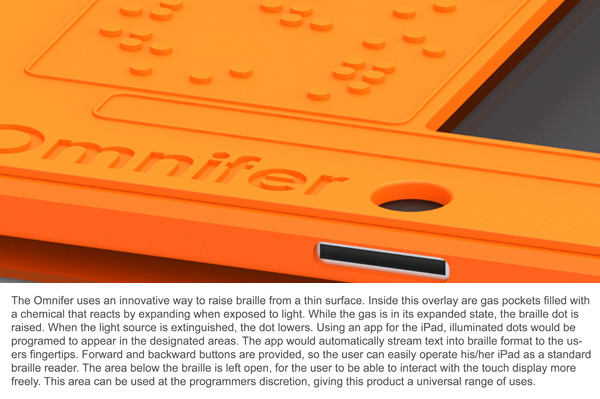
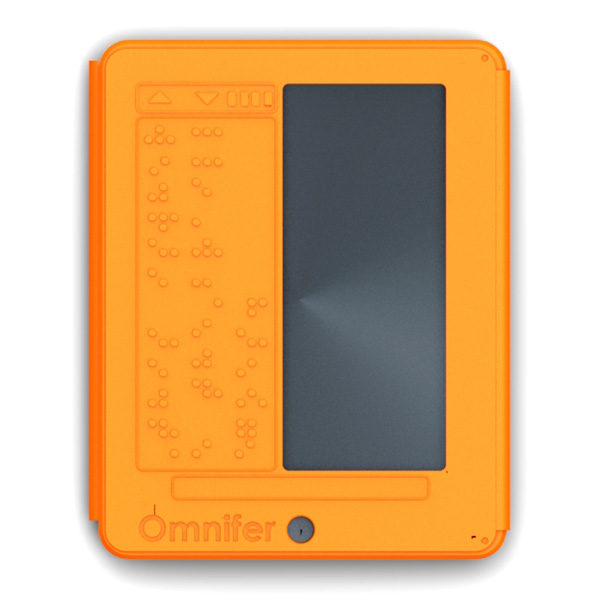
The iPad has many accessibility features built into the software. iOS includes VoiceOver, white on black and zoom. To learn more about iOS accessibility click here, here and here. A new concept case has a built in refreshable Braille display. The Braille display is very thin and does not add much wight. To learn more about thin refreshable Braille displays click here. The Braille display covers half of the screen for non-sighted users this is not a problem. The Braille iPad case is not for sale as of this post. To see more images of the Braille iPad case click read more below.


iOS 5 Reminders App Will Help Everyone

Apple next operating system upgrade for the iPhone, iPad and iPod Touch will include a new app called Reminders. iOS 5 is set to be released this fall. To learn more about the accessibility features in iOS 5 click here and here. The Reminders app will is a to-do list that notify you when you have something to do. Within the app you can make a to-do list and set it to remind you to complete the task at a particular date and time. The app can also remind you to do something when you leave or enter a location. For example you could set a reminder to alert you to pick up the eggs after work. The new reminder app in iOS 5 will help many people remember tasks through out the day. Apple explains the Reminders app on apple.com as,
"Next time you think to yourself, “Don’t forget to...,” just pull out your iPhone, iPad, or iPod touch and jot it down. Reminders lets you organize your life in to-do lists — complete with due dates and locations. Say you need to remember to pick up milk during your next grocery trip. Since Reminders can be location based, you’ll get an alert as soon as you pull into the supermarket parking lot. Reminders also works with iCal, Outlook, and iCloud, so changes you make update automatically on all your devices and calendars."
The Reminders app is not available on the app store and is only available for iOS 5. Click read more below to see more images and a video of the Reminders app.


8/9/11

iOS Refreshable Braille Display Support


iOS has support for refreshable Braille displays. A Braille display allows a blind user to access the device. Refreshable Braille displays are compatible with the iPhone, iPod Touch and iPad. The Braille displays connect to your iOS device via Bluetooth. The pairing process is simple and quick. When the Braille display is connected to the device the Braille display can control the VoiceOver cursor on the display. The VoiceOver cursor can be used to select and read items on the screen.. Braille display compatibility allows blind users to access the information of their iOS device. For a list of compatible Bluetooth Braille displays click here. Watch the above video to learn more.

7/21/11

Mac OS X Lion Includes New Accessibility Features

Apple released Mac OS X Lion to customers yesterday. Lion brings some features of the iPad and iPhone to Mac computers. Lion is available on the Mac App Store for $30. The new operation system includes 250 new features including a number of new accessibility features. Some of Lion’s new accessibility features include VoiceOver improvements, improved support for refreshable Braille displays and a new zoom features for people with low vision. Some of the VoiceOver improvements include better built-in voices and the ability to add your own high-quality voices. Lion also improves better drag and drop support for VoiceOver users. Yet another feature called “VoiceOver Activities” allows you to set custom voices and voice speeds for different tasks. “For example, you can create an activity to use a certain voice and faster speaking rate when you’re shopping online catalogs. Create a second activity to use a different voice and slower speaking rate when you’re reading online newspapers.” Quote taken from Apple.com. Lion also include a new setting that allows users to control the verbosity setting for their Braille display. Lion with its new accessibility features and other new features is a worthy upgrade for any Mac user. Mac OS X 10.7 Lion is $30 from the Mac App Store.

7/18/11

SayText App Review


SayText is a free OCR app for iPhone that recognizes text within a document and reads it back to you with VoiceOver. The app does not work as quickly as the Intel Reader but is fairly quick. The app is very simple to use and does not include a lot of features. Focusing the text in iPhone camera is hard and requires a steady hand. The app includes an automatic image capture feature when the text is in focus. Make sure the camera flash is on to increase the image and scan accuracy. SayText is free in the iTunes app store so there is no harm in trying it out.    

7/16/11

Intel Reader Vs. SayText iOS App


This video is a comparison of the Intel Reader and SayText iPhone app. The Intel Reader recognized the text much quicker then the SayText iPhone app. The SayText app is free from the iTunes app store while the Intel Reader is $900. Both were very accurate at recognizing the text within the article (OCR). Once SayText recognized the text you could use VoiceOver to read the text aloud. With the Intel Reader it was quicker and easier to take a photo of the text in focus. Both methods are good for getting print material into a accessible format quickly.